


TL;DR
Your homepage should move the right visitor from “who is this?” to “I want to talk to them.” Most small business homepages need the same 10 sections, in this order:
- Hero: headline, subheadline and one button
- Trust bar
- The problem you solve
- Services
- About snippet
- How it works
- Testimonials
- Featured work or results
- FAQ
- Closing call to action
Skip image sliders, walls of text and five competing buttons. Below, you’ll find what to write in each section, plus a checklist you can save.
Your homepage has one job: help the right person decide to take the next step with you. Not to tell your whole life story. Not to list every service you’ve ever offered. Just to move someone from “who is this?” to “I want to talk to them.”
When small business owners ask me what to put on their homepage, the answer is almost always the same 10 sections, in roughly the same order. Here’s what each one is for and what to write in it.
Want the actual words for each section? The free Copy-Paste Homepage swipe file has ready-to-use copy for every section, written three ways.
1. Hero Section: Headline, Subheadline and Button
This is everything a visitor sees before they scroll. It needs to say what you do, who it’s for, and what to do next.
- Headline: what you do, in plain language. Skip the clever slogans.
- Subheadline: who you help, where, and the main benefit.
- Button: one primary action, like “Book a call” or “See the menu.”
- Image: a real photo of you, your work or your space beats stock photography every time.
If the hero is the section you’re stuck on, I put together a bunch of homepage copy examples you can adapt. For the headline itself, try these 20 homepage headline formulas.
2. Trust Bar
A thin strip right under the hero that answers “can I trust them?” at a glance. Think: star rating and review count, “As seen in” logos, years in business, or certifications. Keep it to one line.
3. The Problem You Solve
This is the section most homepages skip, and it’s often the most persuasive. Name the frustration your ideal client is feeling in their own words. When someone reads it and thinks “that’s exactly my situation,” they keep reading.
Your website looks fine, but the phone isn’t ringing. You’re not sure if anyone can even find you on Google, and you don’t have time to figure it out.
4. Services or Offers
List your main services, ideally three to five. Each gets a short title, a one or two sentence description focused on the result, and a link to its own page. If you offer twelve things, group them into categories so the homepage doesn’t turn into a menu.
5. About Snippet
Two to four sentences about who you are and why you do this work, with a photo and a link to your full About page. The goal is connection, not credentials. People hire people they like.
6. How It Works
A simple three or four step process takes the mystery out of working with you. It answers “what happens after I click the button?” which is one of the biggest silent objections on any service business website.
- Book a free call
- Get a custom plan and quote
- We get to work
- You enjoy the results
Want your homepage copy already written? Grab the free Copy-Paste Homepage: 30 ready-to-use pieces of homepage copy, every section written three ways.
7. Testimonials
Pick two or three reviews that are specific: they mention a result, a worry that went away, or what it was like to work with you. Include the person’s name and, if possible, a photo or their business name. Specific reviews do far more than “Great service, highly recommend!”
8. Featured Work or Results
Show, don’t just tell. For a designer, that’s a few portfolio pieces. For a contractor, before and after photos. For a coach, a client result with a number attached. If your work is visual, this section might be the most important one on the page.
9. FAQ
Four to six short questions and answers that handle your most common objections: pricing, timeline, service area, what’s included. FAQs also give Google and AI search tools clear, quotable answers about your business. More on that in What Is GEO?.
10. Closing Call to Action
The final section catches anyone who scrolled all the way down. Restate the main benefit in one line, then repeat the same primary button from your hero. Same action, same wording. Consistency beats variety here.
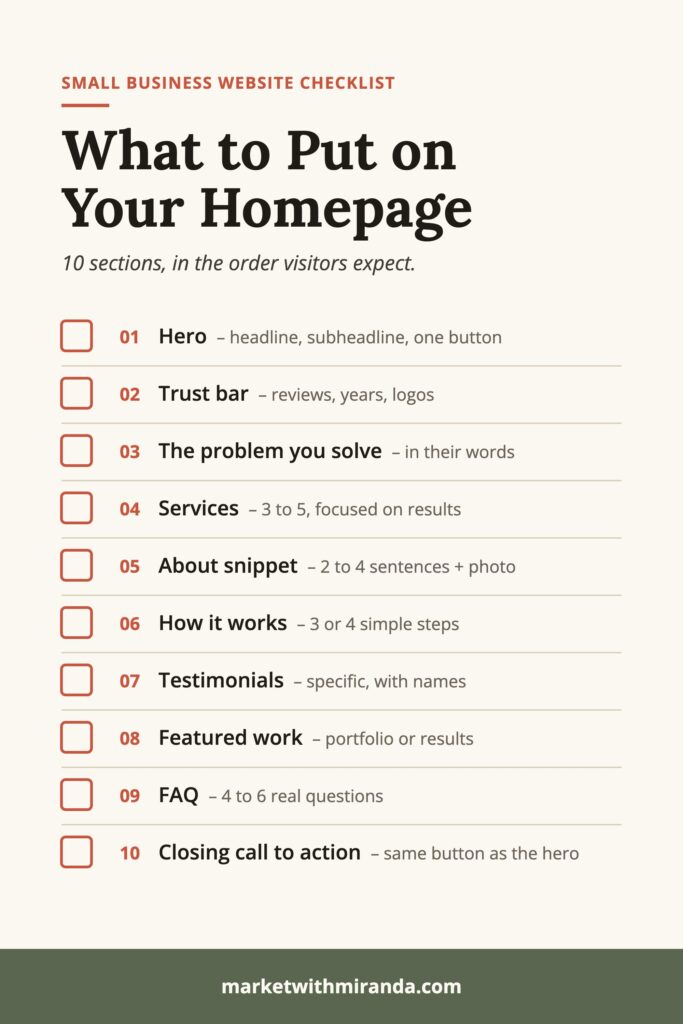
Save this checklist for the next time you build or refresh your homepage:

What NOT to Put on Your Homepage
- A giant image slider. Almost nobody waits for slide three.
- Every single service in detail. That’s what service pages are for.
- Five different buttons. Too many choices means no choice gets made.
- A wall of text about your history. Save it for the About page.
- Your latest blog posts at the top. They’re fine near the bottom, but they shouldn’t be the first thing people see.
Do You Need All 10 Sections?
Not always. A brand-new business might skip testimonials until the reviews come in. A restaurant might swap “How It Works” for hours and a menu link. But if you’re starting from a blank page, building all 10 and then trimming is much easier than guessing.
The order matters more than the exact count. Lead with clarity, build trust, explain the offer, handle objections, then ask for the next step. Once it’s built, check it against these 9 homepage mistakes I see on almost every small business website.
Homepage Sections FAQ
What should I put on my homepage?
Most small business homepages need 10 sections: a hero with a clear headline and one button, a trust bar, the problem you solve, your services, a short about snippet, how it works, testimonials, featured work or results, an FAQ and a closing call to action.
What order should homepage sections go in?
Lead with clarity, then build trust, explain your offer, handle objections and ask for the next step. In practice that means hero, trust bar, problem, services, about, process, testimonials, featured work, FAQ and a closing call to action.
How long should a homepage be?
Long enough to answer what you do, who it’s for, why to trust you and what to do next. Keep each section short and link out to service and about pages for details instead of putting everything on the homepage.
What should not go on a homepage?
Avoid large image sliders, every service described in full, five or more competing buttons, long walls of text about your history, and blog posts at the top of the page.
Do I need all 10 homepage sections?
Not always. A new business might skip testimonials until reviews come in, and a restaurant might swap the process section for hours and a menu link. Starting with all 10 and trimming is easier than guessing.
How many calls to action should a homepage have?
One primary call to action, repeated in the hero and the closing section with the same wording. Everything else should be a quieter text link.
Fill Every Section Faster
Knowing what to put on your homepage is half the battle. Writing it is the other half. The Copy-Paste Homepage is a free swipe file with 30 ready-to-use pieces of homepage copy, covering 10 sections written three ways each. Pick the version that sounds like you, swap in your details, and call your homepage done.